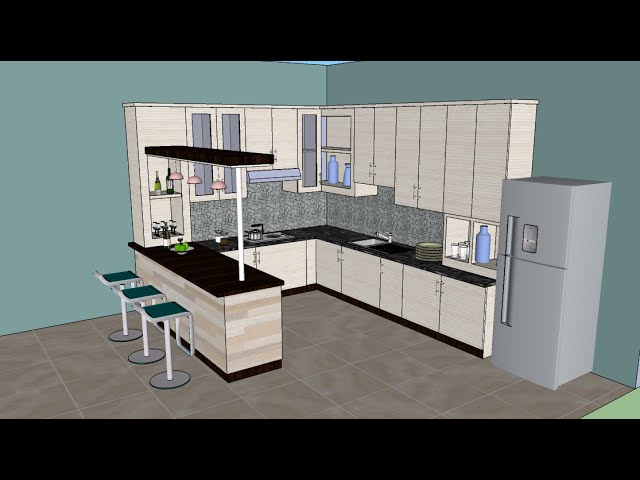
Are you dreaming of a kitchen that perfectly fits your style and needs? Designing your kitchen in SketchUp can make that dream a reality.
This powerful tool lets you visualize your ideas in 3D, ensuring every detail is just right before you commit to any changes. Whether you’re planning a full renovation or a simple update, learning how to use SketchUp can save you time, money, and stress.
Imagine easily experimenting with different layouts, colors, and materials until you find the perfect fit. In this guide, you’ll discover how to design your ideal kitchen using SketchUp, transforming your vision into a virtual reality. Dive in to unlock the secrets to creating a space that’s both functional and fabulous.

Credit: www.udemy.com
Setting Up Sketchup For Kitchen Design
Discover the essentials of designing a kitchen with SketchUp by exploring its user-friendly tools. Start with setting up accurate measurements and choosing the right materials. Use 3D models to visualize and refine your kitchen layout effortlessly.
Setting up SketchUp for kitchen design is the first step. It helps you create a functional and beautiful kitchen. This process involves installing the software, selecting the correct template, and understanding its interface. With these steps, you can start your kitchen design journey.Installing And Configuring
First, download SketchUp from the official website. Choose the version that suits your needs. After downloading, begin the installation process. Follow the on-screen instructions. Once installed, open the software. Go to preferences to configure settings. Adjust units to metric or imperial based on your location. Customize toolbars to include essential tools for kitchen design.Choosing The Right Template
Start with the right template. It makes your work easier. Open SketchUp and choose a template. For kitchen design, select an architectural template. It provides the necessary settings for accurate design. This template includes the right scale and units. It saves time and ensures precision.Understanding The Interface
Familiarize yourself with the SketchUp interface. The main window displays your design space. On the left, find the toolbar with essential tools. Use these tools to draw, move, and rotate objects. The default tray on the right shows layers, styles, and more. Learn to navigate the view options. Orbit, pan, and zoom to explore your design from different angles. Understanding this interface is crucial for effective design. By setting up SketchUp correctly, you lay the foundation for a successful kitchen design project.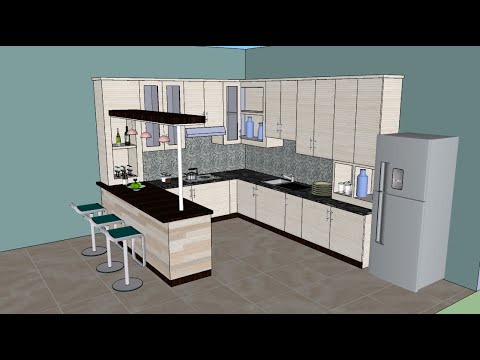
Credit: www.youtube.com
Planning Your Kitchen Layout
Designing a kitchen layout in SketchUp becomes easy with clear steps. Start by sketching your kitchen’s dimensions. Use SketchUp tools to arrange appliances, cabinets, and countertops. Adjust elements for efficiency and style, creating a functional space that reflects your taste.
Planning your kitchen layout is a crucial step in design. With SketchUp, you can visualize and perfect your space. A well-thought-out layout enhances functionality and aesthetics. Begin by understanding your space and needs. This makes the design process smoother and more rewarding.Measuring Your Space
Accurate measurements are essential. Use a tape measure to record dimensions. Note the length, width, and height of the room. Include windows and doors in your measurements. This ensures your design fits the space perfectly. Measure twice to avoid errors.Creating A Floor Plan
Start by sketching a basic floor plan. Use SketchUp to bring your ideas to life. Drag and drop elements to visualize your kitchen. Adjust the plan as needed for balance. Keep your plan simple and easy to understand. This helps in making informed decisions.Considering Workflow And Efficiency
Think about how you’ll move in your kitchen. Place elements for easy access and minimal movement. The stove, sink, and fridge should form a triangle. This enhances efficiency in cooking and cleaning. Consider the placement of cabinets and appliances. They should be convenient and accessible.Designing Cabinets And Storage
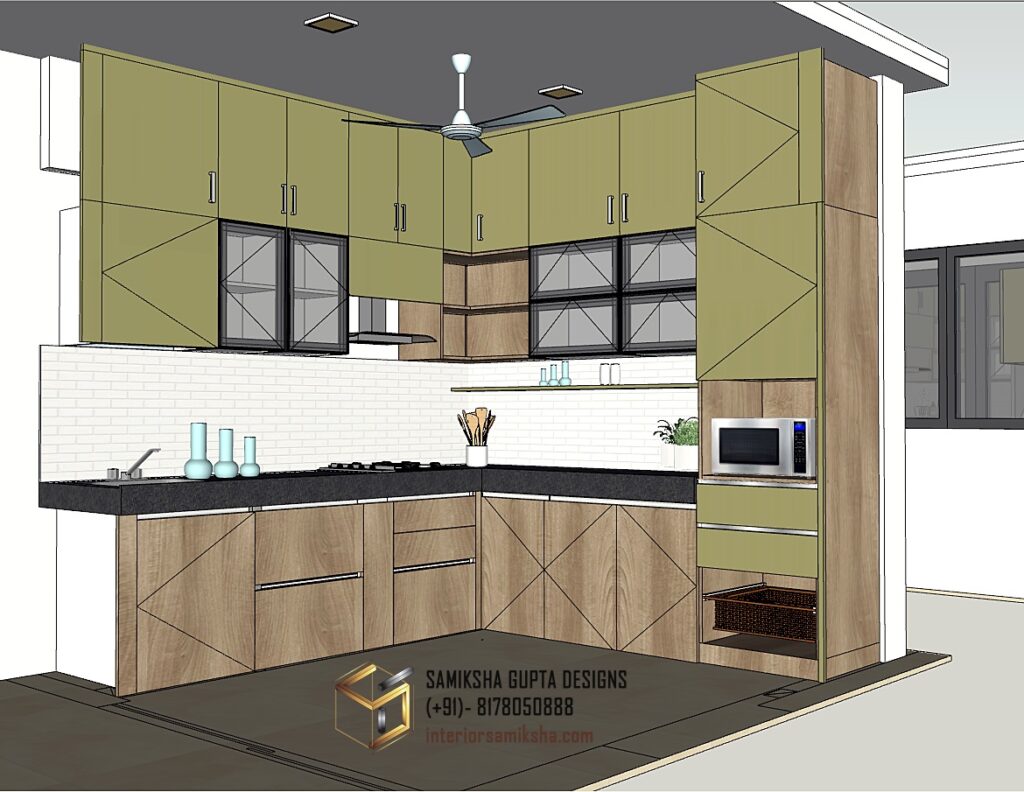
Designing cabinets and storage in SketchUp can transform your kitchen’s functionality. Proper organization makes cooking enjoyable. It also adds aesthetic value to your space. Let’s explore essential aspects of this process.
Selecting Cabinet Styles
Cabinet styles set the tone for your kitchen design. Modern kitchens benefit from sleek, minimalistic styles. Traditional kitchens might need ornate, classic designs. SketchUp offers a variety of styles. Choose one that complements your overall theme.
Customizing Dimensions
Every kitchen has unique dimensions. SketchUp allows precise measurements. You can tailor cabinets to fit any space. This ensures efficient use of every inch. Use the software’s tools to adjust height, width, and depth. Create a design that’s both functional and pleasing.
Incorporating Storage Solutions
Effective storage solutions are crucial in any kitchen. SketchUp helps visualize options like pull-out shelves or lazy Susans. Plan for drawers to store utensils and gadgets. Include vertical storage for pots and pans. Maximize space while maintaining accessibility. This enhances usability and keeps your kitchen organized.
Credit: interiorsamiksha.com
Choosing Materials And Finishes
Designing a kitchen involves more than just layout planning. Materials and finishes bring your design to life. They set the tone and enhance visual appeal. Sketchup offers tools to visualize these elements effectively. You can experiment without any physical changes.
Understanding materials and finishes boosts your kitchen’s overall look. It also influences the space’s functionality. Let’s explore how to choose wisely.
Exploring Material Options
Sketchup allows you to browse material libraries. You can explore various textures and patterns. Wood, metal, glass, and stone are popular choices. Each material has unique traits. Wood offers warmth, metal adds modern touch, glass gives openness, stone brings durability.
Consider your lifestyle while selecting. Do you need easy-to-clean surfaces? Should it withstand heavy use? Answering these questions helps narrow down options.
Applying Textures And Colors
Textures and colors define your kitchen’s personality. Sketchup lets you apply them easily. Choose colors that reflect your style. Light shades make spaces feel open. Dark tones add depth and drama.
Textures give surfaces a tactile feel. Glossy finishes shine, matte surfaces offer subtlety. Mix and match to create visual interest. Ensure harmony across elements for a cohesive look.
Balancing Aesthetics And Functionality
Balance aesthetics with functionality. Your kitchen should be beautiful yet practical. Sketchup helps visualize this balance. Incorporate functional materials where needed. Durable countertops, resilient flooring, sturdy cabinetry enhance usability.
Don’t compromise on beauty. Functional elements can be stylish too. Choose designs that support daily tasks. Your kitchen should cater to cooking, cleaning, and entertaining needs.
Adding Appliances And Fixtures
Designing a kitchen in SketchUp involves adding appliances and fixtures to create a functional space. Consider the layout carefully and choose the right size for each item. This ensures a seamless integration into the overall design, enhancing both aesthetics and usability.
Adding appliances and fixtures in your SketchUp kitchen design is a thrilling step that brings your vision to life. This phase transforms your basic layout into a functional culinary space. Imagine the convenience and style you can achieve by strategically placing your appliances and fixtures. But how do you ensure everything fits perfectly? Dive into the details below to make your kitchen design efficient and aesthetically pleasing.Positioning Major Appliances
When placing major appliances like your refrigerator, oven, and dishwasher, think about workflow. You want to create a kitchen triangle—connecting the sink, stove, and refrigerator—to optimize movement while cooking. SketchUp allows you to visualize this triangle, ensuring smooth transitions. Consider the distances between these appliances. Too close, and your workspace becomes cramped; too far, and you lose efficiency. Have you ever cooked in a kitchen where reaching the fridge felt like a marathon? Avoid this by carefully measuring and positioning each appliance in your design.Integrating Plumbing Fixtures
Adding plumbing fixtures requires precision. Place your sink strategically within the kitchen triangle for easy access. Think about proximity to the dishwasher for simple dish transfers. SketchUp lets you map out the plumbing lines, ensuring they fit seamlessly within the design. Pay attention to the space under the sink—enough room for pipes without compromising storage. Have you considered adding a pot filler above the stove? It’s a handy fixture that saves trips to the sink. Visualize it in SketchUp to see how it complements your layout.Ensuring Ventilation And Lighting
Good ventilation is crucial, especially if you love cooking aromatic dishes. Decide on the placement of your range hood—it should be directly above your stove. Using SketchUp, check that the hood is at the right height and position for optimal airflow. Ventilation not only removes odors but also keeps your kitchen fresh and inviting. Lighting is another key element. Plan for both ambient and task lighting. SketchUp lets you test various lighting setups to find what works best. Have you tried layering your lighting for a cozy effect? Think about how you use your kitchen. Do you need brighter lights for prep areas and softer ones for dining? SketchUp helps you visualize these scenarios, ensuring your kitchen is both functional and welcoming. — Designing your kitchen in SketchUp is not just about placing objects—it’s about creating a space that enhances your daily life. How will you balance style and functionality in your design? Use these tips to guide your choices, and make your kitchen a place where you love to spend time.Enhancing With Accessories And Decor
Designing a kitchen in SketchUp becomes exciting by adding accessories and decor elements. These details bring personality and charm to your virtual space. Experiment with different styles and colors to make your kitchen design stand out.
Designing a kitchen in SketchUp is an exciting process where creativity meets practicality. Once you have the core design elements in place, the real fun begins with enhancing your space using accessories and decor. This stage allows you to inject personality and style into your kitchen design, making it not just functional but truly yours.Incorporating Decorative Elements
Decorative elements add warmth and character to your kitchen. Think about open shelving where you can display colorful dishes or a collection of vintage teapots. Experiment with wall art or decals to add a splash of color or an inspirational quote that motivates you daily. Consider using 3D models of plants or herbs in SketchUp. They can bring a touch of nature indoors, making the space feel more lively. Be mindful of balance; too many decorative items might clutter the space visually.Utilizing Space For Accessories
Effective use of space for accessories can transform your kitchen. SketchUp allows you to visualize how small appliances, like a sleek coffee maker or a trendy toaster, fit on your countertops. Aim to find a home for each accessory without overwhelming your workspace. Think about vertical storage solutions. Hanging racks for pots and pans or magnetic strips for knives can free up counter space. Consider if there’s room for a functional island or cart that offers additional storage and style.Adding Personal Touches
Personal touches make your kitchen uniquely yours. Include elements that reflect your personality or family heritage. Perhaps it’s a specific color scheme that resonates with your personal style or a beloved family cookbook displayed on a stand. SketchUp allows you to experiment with different materials for countertops or cabinetry. Play around with textures to see what feels right. Ask yourself, how can this space tell my story? One practical tip is to keep a digital scrapbook of ideas. Use SketchUp to test different combinations, ensuring your personal touches are both beautiful and practical. Remember, the goal is to create a space that feels welcoming and truly yours.Reviewing And Refining Your Design
SketchUp offers intuitive tools to design your kitchen layout effectively. Start by selecting the basic shapes and dimensions. Constantly review and refine elements, ensuring functionality and aesthetics align seamlessly.
Designing a kitchen in SketchUp can be a thrilling journey from concept to a vivid digital representation. However, the magic truly happens during the reviewing and refining stage. This is where you can transform your initial ideas into a functional and aesthetically pleasing space. Whether you’re a design newbie or a seasoned pro, taking a step back to review and refine can make a world of difference. Here’s how you can perfect your kitchen design in SketchUp.Conducting A Design Walkthrough
Imagine walking through your new kitchen without leaving your chair. In SketchUp, you can do just that. Use the walkthrough tool to navigate through your design. This feature allows you to experience your kitchen from different angles and heights. Does the layout flow naturally? Are there any awkward spaces? Observing these aspects in a virtual walkthrough can highlight potential issues you might not notice on a flat screen.Gathering Feedback
Feedback is crucial for refining your design. Share your SketchUp model with friends, family, or even online design communities. Ask them specific questions about the space, like the placement of appliances or the choice of materials. Often, fresh eyes can catch details you might overlook. Remember, the goal is to create a kitchen that not only looks good but works well for whoever will use it.Making Necessary Adjustments
Once you’ve gathered feedback, it’s time to roll up your sleeves and make some adjustments. This might mean rearranging the layout, changing colors, or even resizing cabinets. If your walkthrough highlighted a cramped corner, consider tweaking the dimensions. SketchUp makes it easy to test different ideas quickly. This iterative process ensures your design is both beautiful and functional. Have you considered how your kitchen will adapt to future needs? Perhaps adding an extra counter for when guests visit or integrating smart storage solutions. By reviewing and refining your design, you’re not just creating a kitchen for today, but one that will stand the test of time.Exporting And Sharing Your Design
Designing a kitchen in SketchUp opens creative possibilities. After crafting the perfect layout, sharing your design becomes essential. Exporting and sharing your kitchen design allows collaboration and feedback. It also helps in presenting your ideas effectively. In this section, discover how to prepare, choose formats, and present your final kitchen design.
Preparing Files For Export
Prepare your SketchUp files efficiently for export. First, ensure your design is complete and accurate. Double-check measurements and details. Adjust lighting and textures for realistic views. Organize layers for clarity. This makes your design easy to understand. Save a backup copy of your original file. This prevents accidental loss during export.
Choosing Formats For Sharing
Choose the right format to share your design. Popular formats include PDF, DWG, and JPEG. PDF files maintain quality and are easily accessible. DWG formats are ideal for professional collaboration. JPEG images are perfect for quick previews. Each format serves different needs. Select based on your audience and purpose.
Presenting Your Final Design
Present your kitchen design professionally. Create a clear and concise presentation. Use high-quality images and diagrams. Include annotations for better understanding. Share your design via email or online platforms. Consider using presentation software for added impact. Keep your audience engaged with visuals and simple explanations.
Frequently Asked Questions
Can I Use Sketchup To Design Kitchens?
Yes, you can design kitchens using SketchUp. It offers tools to create detailed 3D models. Users can customize layouts, cabinetry, and appliances, making it ideal for kitchen design projects. SketchUp’s intuitive interface and extensive library enhance design flexibility and creativity.
Is There An App To Help Design A Kitchen Layout?
Yes, several apps help design kitchen layouts. Popular options include SketchUp, Home Design 3D, and IKEA Kitchen Planner. These tools offer user-friendly interfaces, allowing users to visualize and plan their kitchen spaces effectively. They provide customizable features and realistic 3D models to ensure optimal kitchen design.
How Do I Design My Kitchen Layout?
Plan your kitchen layout by considering workflow, appliance placement, and storage needs. Maximize space with a triangle setup for stove, sink, and fridge. Ensure ample counter space and easy access to cabinets. Prioritize functionality and aesthetics for a comfortable cooking environment.
Consult with a professional designer for tailored solutions.
Is There A Website Where You Can Design Your Own Kitchen?
Yes, websites like IKEA Kitchen Planner, HomeByMe, and Planner 5D allow you to design your own kitchen. These tools offer user-friendly interfaces to create and visualize kitchen layouts. Explore features like cabinet placement, color schemes, and appliance positioning for a customized kitchen design experience.
Conclusion
Designing a kitchen in SketchUp can be fun and creative. Start with clear ideas and measure your space accurately. Explore different layouts and styles. Experiment with colors and textures. Use SketchUp’s tools to shape your vision. Check dimensions for real-life fit.
Adjust as needed for practicality. Share your design with friends or family. Gather feedback for improvements. Practice will enhance your skills. Dive into new projects and refine your techniques. Enjoy bringing your dream kitchen to life. SketchUp makes design accessible for everyone.
Your imagination can transform spaces. Keep designing, keep creating.